How You Can Double Your Link Building Efforts
Blog commenting is becoming more and more popular as one of link building tactics. The comment author receives an extra link to his website or blog that favours the website exposure. And the blog owners are always happy to receive good comments - it’s important for them to keep a lively interest to their posts.
Of course, a "DoFollow" backlink is a great reward for a valuable comment because it helps improve the search engine position. But the comment allows a reader have only one backlink and this link may have the commentator’s name or nickname as the anchor text that doesn’t mean much for search engines.
So why not to reward the comment author with an extra link with more relevant keywords in the anchor text? This is an excellent way to promote the readers’ websites and this can be done automatically with the use of a particular plug-in!
I’m talking about CommentLuv. The CommentLuv is a plugin for WordPress that will visit the RSS feed of the blog address the reader provided in the URL field, attempt to find the last post the reader made and display it under the comment giving the reader a great internal backlink to his/her website!
Example:
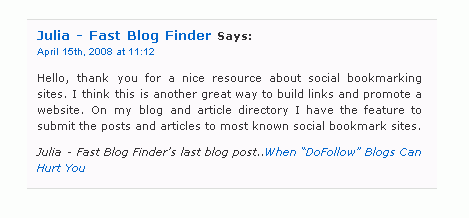
Now many WordPress blogs are applying the CommentLuv plugin. The bloggers understand that it gives the readers an extra incentive to leave a comment, encourages people to add to the conversation by giving something back right away.
For the reader commenting on a blog that uses the CommentLuv plugin is great for the following reasons:
- Second link to the website/blog. CommentLuv gives you an additional link, which is more advantageous than the link provided in the URL field because it has the post title as the anchor text. If you use your keywords in the post title, it will help you to rank well in the search engine results for those keywords.
- More traffic and readership. When people look through the comments, they can see the titles of other commenters’ latest posts. If the title looks interesting, there’s a good chance they will visit your site and read the post. Some of those readers can become your subscribers or buyers.
- Help with PageRank and search engine results ranking. If the blog using the CommentLuv plugin is a "DoFollow blog", the link to your last post provided by CommentLuv will also be "DoFollow". So, not only will it send the readers to your website or blog, it will also pass you some PageRank.
These advantages are really extra incentives to leave a comment, aren’t they?
How to search for blogs that use the CommentLuv plugin
You may be wondering how to find relevant blogs with the CommentLuv plugin enabled on which to comment on. The answer is simple – use Fast Blog Finder or Google and type the search query like below replacing "your keywords" with your real keywords:
"Enable CommentLuv" +"your keywords"
By adding your keywords at the end of the search query, you will reduce the large quantity of blogs to blogs relevant to your niche. You can also use some of these search options to narrow and refine your search results.
For example, if I want to find the blogs that use the CommentLuv plugin and are relevant to the "Internet marketing" keywords, I type in the Blog Finder Gold Edition:
"Enable CommentLuv" +"Internet marketing"
By the time of writing this article I found 127 blogs with CommentLuv enabled for the "Internet marketing" keywords. 39 from these blogs were "DoFollow" and 74 "NoFollow".
Well, I get at least 39 blogs where I can comment on. It’s assumed that my comments are not spam, so I can hope to get 78 "DoFollow" links to my blog (because one comment will have two links: one for the anchor text in the Name field and the second one – a deep link to the latest post on my blog)! And we all know how valuable "DoFollow" links are. Just a couple of them can considerably improve your website ranking in search engines.
Of course, I gave a single niche example but you got the idea. Now you can change your primary keywords to your secondary keyword set and find one more hundred or two of blogs that use the CommentLuv plugin and are worth to comment on.
Few tips from me:
- If you are going to comment on blogs with CommentLuv, make sure your blog posts have appealing titles including your target keywords. Not only will good titles attract the readers prompting them to click on your link, they will also help you rank well for your keywords.
- If you use Feedburner on your blog, you’ll get a redirection link to your last post instead of the direct link to the article on your blog. You can read here how to disable the redirect.
Please, share your thoughts in comments.
If you enjoyed this post, make sure you subscribed to my RSS feed!Filed under: Link Building Tutorials, New Link Building Methods, SEO


I hate link building, why cant search engines just rely on good old fashion on page optimisation, oh well its a good job software like yours is available, cant think of anything worse than trawling through page after page to find blogs.
I think i will be spending the next few weeks using this method thanks.
I just made a comment and wanted to ask this question re Dofollow, i have built several sites all containing a link to my main site (the sites are in all different industries), the problem is when i do a backlink check Google says i have none, should i place rel=”dofollow” in the link as i have not done this? i know what happens with rel=”nofollow”
CommentLuv is an excellent wordpress plugin, which as Julia stated, will not only bring you a link back to your main site via the comment and then an extra to an article, two prizes for the cost of uhm. none.
Thanks for pointing out the FBF trick to find the commentluv enabled links, I will check it out right away!
That was a very interesting post. Keywordluv, have to admit I had never heard of that until your post brought it up. I am going to do like you said and search for that and see what come up. I for one, would love to get 2 links for the price of one, for sure. Thanks for the great post.
Steve
Hello,
No, if you insert rel=”dofollow”, the link will not become DoFollow. There is no a DoFollow tag. You need to use a DoFolow plugin to make the links DoFollow.
Useful tip. But i don’t know what happen if the content of the page and the anchor we used to comment are irrelevant.
Its a good tactic. I have been looking for blogs with comment luv enabled. Actually planning to add hte plugint o my blog as well.
Great article! Thanks for the suggestion on finding the blogs also that use the Comment luv plugin, I hadn’t thought of trying that before!
Thanks Julia,
I love this method and recently shared a video with my subscribers on how to do it. Your description is sooo much better than mine however! I see you have had time to actually install the plugin, that’s on my long list of things to do…
Cheers,
Tom Deeter
So this technique works with Wordpress blogs…are there plugins for other blog applications? Or rumours of those types of plugins?
Karen
Hi Julia’
Thanks for all the good information you have been giving. I presume that this works only for those websites which have blogs. In other words it won’t reference say the last page built on a web site.
If you don’t have a blog on your site this won’t work?
Terry
Ok, so I followed the link to CommentLuv to see how it works in more detail. It seems to require that your own blog (not the one you comment on) to meet some technical specs that my blog doesn’t meet.
But it also includes a description of adding some bracketed text to point CommentLuv to your own blog feed. I’m using that now in this comment. It seems to me that you’d have to check for certain that the blog author has enabled CommentLuv before using this technique, otherwise your extra text would show up in your comment.
Julia this is great stuff. I started using Blog Finder Gold, and my web site shot up to the #1 listing in Google for my anchor text “LASIK Surgery Resource”. Your insights and suggestions have been remarkably helpful. Thank you!!
This is very cool! I just HAD to make a comment and see it in action!
I searched Google for CommentLuv and prowled around other websites, saw one at http://quityourdayjob.com.au that had a terse one line lasting of a past comment. I ‘ll be interested to see how this one looks!
Obviously now I have to go and drag out my copy of Blog Finder and give this a try!
Andrew larder
MarketingSharks.com
Julia,
Do you know of a quick way to find KeywordLuv blogs to comment on? I tried a search based on what you have above but it looks like that is a custom message.
Thanks!
Peter
PS: I use your Blog Finder tool and recommend it to lots of folks.
Will it hurt my rankings if I only add comments to Dofollow sites and no comments on Nofollow sites. I still haven’t seen any improvements in my rankings for “Exhibition stands”. How long do you think it will take before I see any improvements.
Regards
Mark Gallagher
Julia,
Excellent post as always, I had not thought of searching for the CommentLuv plugin. This would indeed be a great way to get an additional link without additional effort.
Keep the insights coming!
Thanks,
George
i have tried your system, it very good to build link. Unfortunately, it still depend on the webmaster to publish it or reject. The conclusion here, there are a lot of work to do. it take me a month to go.
Julia, i have faithfully clicked every email you have sent and read every blog entry on your site. They are all good, and though i have been in the biz for too long ( lol ) i have never find anything wrong with your advice…
Until now, ha ha. Getting two links instead of one makes no difference to Google, it counts only 1 link.
Even if you have 500 pages on site A with multiple links to site B, only 1 link will count. I have read this in more place than one and even when you look at the math that was allegedly used to emulate the internal calculations that Google uses, this one link being counted theory really does make sense.
Where having a second link would absolutely count, is in getting real traffic from readers who don’t realize that the name field of the author is a hot link.
Do I have this correct ?
Big T
Very helpful information! We always learn new pieces of helpful internet marketing information. The trick is putting these fantastic suggestions to good use.
KeywordLuv is a new concept we were unaware existed. Thank you for all your great advice and recommendations. We look forward to your next post….
Thanks for such a great post on “How You Can Double Your Link Building Efforts”. It really gives your readers that extra incentive to post a comment.
I seen CommentLuv plugin before in passing but never took the time to understand it. Thanks to your post,I now realize it’s something I should take more serious.
By the way, has anyone use the WordPress Top Commenters Plugin / Widget?
Terrific concept… Julia. I’m impressed to see it working in the way it does. Although I’m impressed how clever scripts can be. Your GLock Software has pride of place on my desktop. Keep it coming…
I enabled the commentluv plugin on my own blogs after seeing it in action on a number that i post on, I really do love this plugin and think it offers a great reward for commentators to ensure the debate is maintained. What I will maintain that it is also a possible spammers delight and so keep comments from auto publishing so as to avoid any instances as I battle to prevent the spammers :o)
I do agree though that this is a great tool.
This is a great post … I try leaving comments at other people’s blogs, hoping NOT to initially gain better positioning for a website, but hoping it will land me to something that’s outside my sphere of influence. And when possible, I’d like to expand that friendship to offline by nurturing it. This type of plug in will help marketers build partnership quickly if used with respect and goodwill.
HI,
This is a great post, another informative post on linkbuilding. This site has helped me alot.
Although I hate commenting on blogs, this would be the only blog I comment on, b’coz of the qulity and effectiveness of the information provided.
Hi Julie
Thanks very much for this tip. I have just started a new blog and want to get it indexed and ranked as soon as possible. Trawling through blogs looking for dofollow sites has always been a real drag with my other blogs, so Fast Blog Finder is fantastic.
One thing I have noticed is that there tends to be more dofollow sites linked with internet marketing and SEO sites than with other niches. I guess the webmasters are generally more savvy.
Margaret
@Trevor - actually with a commentluv enabled blog, you do get two links for the price of one post.
First you get the link with your name which generally tend to be for the main url and then commentluv grabs the last post from your RSS feed which is a deep submission really, and since the two won’t link to the same URL, there are actually two valid dofollow links to your web site from one comment.
I am just struggling building back link for my blog. This tricks with commentluv plugin will make us half work time, meaning one comment two back links. That is interesting advice from your side.
Thank you for this excellent post and introduction to commentluv. I’ve just started using it on my own blog at moongrabber and it’s great to be able to give something back to commenters. Not only that but the Google search you provided is great for finding other blogs to get some commentluv from.
This is a great tip!! Thanks for sharing.
I have been using your Fast Blog Finder for a couple of weeks now and just love it. It has made finding links so much easier.
I love this plugin. I am planning on placing this on soon on my blog too. and thanx for the search tips, i found a lot of blogs that were related to my article. I hope it does a lot of good in terms of search engine and backlinks.
Informative article. Getting backlink is hard and needs much time. But there should be many tactics to reduce working time If we always try to find it. Thanks for sharing.
@Terry
Yes, the CommentLuv plugin works only for the blogs. I tried to submit a comment providing the URL of a regular website http://www.experarticles.com and the CommentLuv didn’t find RSS and the last post on that website wasn’t provided under my comment.
@Peter
The KeywordLuv plugin has been released quite recently so there are not many blogs that use it now. However, you can use the following terms in your search query:
@Mark
I would recommend that you read this post on my blog if you haven’t read it yet
http://www.fastblogfinder.com/can-dofollow-blogs-hurt-you/
This post tells about when the comments on “DoFollow” blogs can hurt your website ranking.
@Big T
I also read about the “one link being counted” theory. I understand this means that if the site A has two identical links with different anchor text from the site B, only the first link to the site A is counted by Google. Yes, this makes sense. But in the case of CommentLuv it’s different. You are not getting 2 identical links from your comment. The links are different: the link with your Name as the anchor text will point to your website main page and the link provided by CommentLuv is a deep link to the blog’s last post. So, the links differ and both are counted.
You can read this case study for more details
http://www.seomoz.org/blog/results-of-google-experimentation-only-the-first-anchor-text-counts
I must say this doesn’t affect the comments only. For example, if you post an article and include several links with different anchor text all pointing to the same target URL into it, only the first link (anchor text) will be counted regardless of varying anchor text.
“This is an excellent way to promote the readers’ websites”.
Regarding comments on irrelevant Blogs, it is a widely held belief that there is no benefit in having links from irrelevant sites, but I dont believe this to be true. Links may offer little due to pagerank but I believe it all adds up in the “algorithm”
Thanks for the post on CommentLuv, I have started plugging it in on my client sites and only telling them as an afterthought (bad boy).
For the question on how to find a site using CommentLuv, take the quote below (in quotes) and search it as:
“Enable CommentLuv which will try and get your last blog post, please be patient while it finds it for you” keyword
I have a couple of pages on my site in Russian and the person who gave me that idea searched for the keyword ‘russian’
A last trick you can do is never leave your dot com address, post a full link in the URL line that is directly related to the topic that you are commenting on.
Getting 2 links for the work of one sounds great! I’m going to have to put this to use…where does everyone else sit on the irrelevent site post actually hurting your SEO efforts?
Some say it has everything to do with relevant posts to blogs, some say it’s just the total amount of links. Does anyone have any research or study to show which is accurate?
Unbelievable. I just searched for the exact phrase “Enable CommentLuv” on google, and there are 178,000 results. While not all of them are dofollow, I suspect there are some good ones out there as Julia indicated. This product, and the team behind it, is first class. Recommended.
steve
Thanks Julia! That’s one really super tip! I just wish more blog owners would get back with the program and remember what blogs were born to be. Informal communication portals between bloggers and their readership.
I know the Internet has changed with eCommerce booming and all but lets not let those spam marketers ruin our good thing. Hey, everyone has probably got something for sale. So if we go back to the good days, simply post and make relevant comments that promote dialogue like you are allowing here we can not only see the success of a great product such as Blog Finder skyrocket, but we’d also see more quality products in all markets rise above the repackaged stuff that abounds nowadays.
Anyway, thanks again - not only for the tips, but also for what a great tool your Blog Finder is.
Thanks for the great tip, due to several night mares in the last couple of years i don’t have any cash to advertise the site i’ve been building for some time, so i have been looking for all the free stuff i can get to get my site out there. This will certainly help thanks again
Pyro chuck
Well, I came here looking for info on CommentLuv plugin but it looks like you have switched to using KeywordLuv plugin instead. I assume you like it better? I will check your website for article explaining why you are changing your recommendation. I am looking for plugin that improves communication and collaboration.
I have two plugins - CommentLuv and KeywordLuv - enabled on the blog. As you can see there is a line in your comment that provides the URL to the latest post on your blog. So, CoomentLuv works.
This a link building tactic that I recommend. It works great. By the way, I’m adding you to my master dofollow, commentluv and keywordluv list. Thanks.
So the combination of the two plugins is fabulous and so is your website. I found it through a comment you left on another site and have been reading every article. I am going to download the free version and give it a test drive. If it is as good as it looks, I will be a paying customer soon.
Thanks for all the good and straight forward information.
I think this is a fantastic plug-in find. Thanks for sharing. Oh and BTW, your software is easily the best I’ve used. I tried one of your competitors and, let me just say you definitely get what you play for.
The fast blog finder tools is very powerful, there is so much that can be done with it. I’m still learning but so far so good.
Thanks for the help! I have started using this advice for my blog postings and have noticed the results. In terms of SEO, I am curious how valid those double links are in terms of being counted by the search engines.
Hello,
I just made a comment and wanted to ask this question re Dofollow, i have built several sites all containing a link to my main site (the sites are in all different industries), the problem is when i do a backlink check Google says i have none, should i place rel=”dofollow” in the link as i have not done this? i know what happens with rel=”nofollow”
No, if you insert rel=”dofollow”, the link will not become DoFollow. There is no a DoFollow tag. You need to use a DoFolow plugin to make the links DoFollow.
Thanks for that info thats great maybe im being a bit thick now but where can i get a dofollow plug from any good suggestions guys?
i have recently downloaded the blog finder (i got a free trial version think have to upgrade pretty soon).
it’s a great little tool for finding relevant blogs, but now after reading the comment luv i have started to focus all my attention to that.
I get quality backlinks from informative blogs and mostly positive comments from like minded people who actually have something interesting to say.
PS are there any other free tools that are available?
Yes, findingblogs with commentluv is a great idea!
Another great idea is to find blogs with the top commenters… so that you can get free sitewide links.
DoFollow Diver - DoFollow Blog Search Engines last blog post.. Link Building Tip: Get Free Backlinks From Getting Free Reviews
I never thought about getting two links back when you comment on a blog with CommentLuv. Now there is more reason to comment than ever before!
Stop Grinding Teeth - Sheilas last blog post.. How To Stop Grinding Teeth At Night