How to Protect Your Affiliate Links


In this article I'd like to share with you a couple of tips and tricks on how you can protect your affiliate links and skip the merchant's opt-in page (and even replace the merchant's sales page with your own sales page) when marketing as an affiliate.

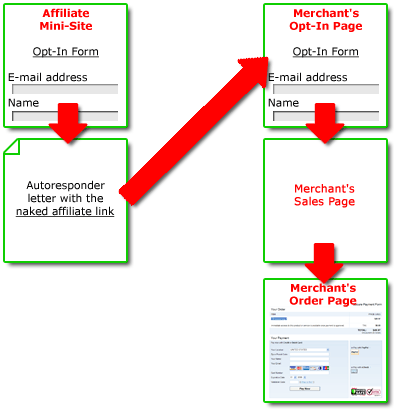
Being an affiliate provides you with a great opportunity to build your own email list. You can setup a mini-site which outlines the benefits of the product or service you are promoting and add an opt-in form to the site where people need to enter their email address and name in order to access the product sales page. You also setup an autoresponder that will send a confirmation letter or open a confirmation page after signup and you provide the visitor with a referral link that includes your affiliate ID and normally leads to the merchant's sales page.

But it can happen that the referral link leads to the merchant's opt-in page. So, people have to opt-in again in order to get to the actual sales page. This can be a real problem because double opt-in procedure turns many visitors away. They have already signed up and they must do it again. It's nonsense! The situation becomes worse if you send them follow-up emails offering other products from the same merchant and refer them to the opt-in page where they are forced to subscribe again, again and again. The result – you lose potential purchasers and commission. That's the real problem.
aflink1 How to Protect Your Affiliate Links


So, you need to be able to bypass the page with the merchant's opt-in form and send people directly to the sales page. This is what exactly you can do with G-Lock Affiliate link Cloaker.
 

How to get around the double opt-in scheme using G-Lock Affiliate Link Cloaker

It’s assumed that you know the URL of the merchant’s sales page. You fill in the Affiliate Link Cloaker form in this way:

  • Affiliate Link: your affiliate link, example: http://affiliateid.merchant.hop.clickbank.net
  • Destination Link: the sales page URL, example: http://www.merchant.com/salespage.htm
  • File Name: somepage
  • Click Save to Disk to save your encrypted affiliate link to the somepage.html file.
  • Upload the somepage.html file to your web site.

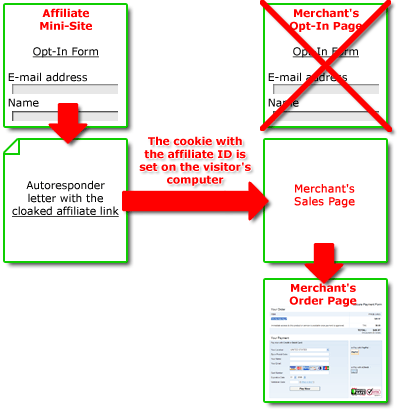
Refer people in your confirmation letter or page to the somepage.html page that will then redirect them to the merchant's sales page.
aflink2 How to Protect Your Affiliate Links


In summary, you do this:

  • Encrypt your affiliate link and the merchant's sales page using G-Lock Affiliate Link Cloaker.
  • Upload your stealth page on your website.
  • Refer people to your stealth page that redirects them straight to the sales page bypassing the merchant's opt-in page and sets the cookie with your affiliate ID.
  • Get commission from every purchase.

The visitor then:

  • Signs up on your mini-site.
  • Clicks on your referral link. The affiliate cookie sets up on the visitor's computer.
  • Goes directly to the sales page to purchase the product.

How to get around the merchant's sales page using G-Lock Affiliate Link Cloaker

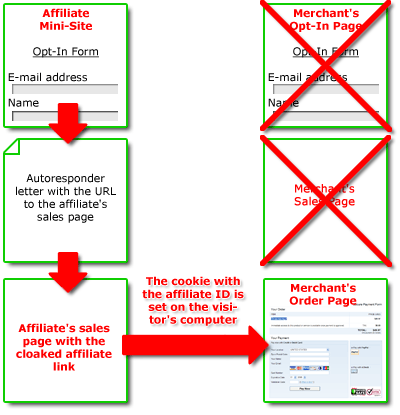
This is an advanced technique of using the cloaked affiliate links. If you don't like the merchant's sales page, you can create your own sales page for the product or service you are promoting as an affiliate and send people directly to your sales page bypassing the merchant's sales page. The advantage of this tactic is that you have a full control over the sales page. You can edit it as you want, tweak it to increase your conversion rate and sales.

You fill in the Affiliate Link Cloaker form in this way:

  • Affiliate Link: your affiliate link, example: http://affiliateid.merchantid.hop.clickbank.net
  • Destination Link: the merchant's order page URL, example: http://productid.merchantid.pay.clickbank.net
  • File Name: somepage
  • Click Save to Disk to save your encrypted affiliate link to the somepage.html file.
  • Upload the somepage.html file to your web site.

Point the "Buy Now" button on your sales page to the somepage.html page and refer people in your confirmation letter to your own sales page. 
aflink3 How to Protect Your Affiliate Links

 Please, share your thoughts on the article in comments.


Like what you see? Then subscribe to GLOCKSOFT Insiders and reap big benefits!

By subscribing to my free GLOCKSOFT Insiders email list, you will regularly receive special member-only insider information, discounts and freebies. You will also be notified when new articles are posted here at the blog.

It's absolutely free to subscribe.

For subscribing today, I will give you a valuable free gift as well!

You can leave the list at any time. Removal instructions are included in each message.

  • Digg
  • del.icio.us
  • Reddit
  • Sphinn
  • StumbleUpon
  • Technorati
  • Slashdot
  • Propeller
  • Google Bookmarks
  • Facebook
  • MySpace
  • LinkedIn
  • Twitter
  • email
  • PDF


Related posts

17 Responses to “How to Protect Your Affiliate Links”

  1. I like the way your posts give us lots of sneaky tricks using this great piece of software. thanks

  2. Brandon says:

    One of those ‘Ah-HA!’ moments. I knew this could be done but never sat down to think it through or to consider the cookie benefits. One of those gold nuggets that give your readers an edge up. Even though it requires a little more work it sounds well worth it.

  3. Austin says:

    Nice one Julia :)

    Will Google read the alc.html page though since it uses a redirect?

  4. Julia says:

    Hello Austin,

    No, Google will not read your alc.html page because it is encrypted. At any case you can set that link as “NoFollow”.

  5. Dom-Casino says:

    Hi Julia,
    I have problem with the affiliates link of my website.
    My website sending significant amount of traffic to the affiliates still i am not getting any single penny.
    Because i have place rel=”nofollow” attribute to the affiliates links.
    Are you sure affiliates don’t bother about it the link attribute?
    Your suggestion will be helpful to me.

  6. John from Fitness Builders says:

    @ Dom,

    No, the nofollow tag has absolutely nothing to do with you affiliate omissions being tracked. All that matters is that when the URL is visited the cookie is recorded. If you are sending traffic it may not be converting because
    a) It isn’t targetted enough
    b) The sales page does a bad job of converting
    or c) The visitors are not tracked properly.

    Either way I’d suggest using a different affiliate program and seeing if the results are the same

    Johns last blog post.. Vegetarian Diet – The Best Way To Be Fit

  7. Sasha Antich from web designer s says:

    I agree that this trick can prevent i.e. turning many of your web site visitors away – and as result loosing certain amount of your earnings. More potential customers – more significant amount of your earning you will lose.

  8. Francis from 150CC scooter says:

    Always use a redirect url for your affiliate links – one that you can control.

    I created a free .pdf to be freely distributed. In this special report I used direct linking to the vendor (I used my affiliate link pointing directly to the vendor). About one month went by, and the vendor changed their affiliate program from Linkshare to being managed in house. Now my links in the special report cannot be altered, because they point directly to the vendor’s site from within the .pdf. Of course I don’t recieve any commissions since they are no longer using Linkshare, but they are still getting traffic from my free report.

    So I learned this lesson the hard way…

    Always use a redirect that you have the ability to modify. This way you can update your links if/when something like this happens to you.

  9. net from Anamiba reisen says:

    By-passing the Merchants opt-in page seems to be a great strategy.

    Will try it soon with your Link Cloacker.

    Thanks for these useful tips! Was never aware of them…

  10. Riggie from website marketing strategies says:

    G-Lock Affiliate Link Cloaker seems to be a sensible script, but with the problems described above, it’s a good question whether it’s worth buying.

    Maybe someone who has use it extensively can comment here…

  11. Joe from Learn About Credit Cards says:

    Oh wow, that is a really smart idea! I never thought of that, but was aware of the problem. I hate to think of how much commission I may have missed out on. From now on I’m going to implement your methods onto some of my affiliate sites that require information such as the name and email. I’m really finding your website helpful and interesting!

    Joes last blog post.. 0 APR Credit Card Applications

  12. Web Design says:

    One of the way is that if you redirect your affiliate link through META tags or through any other method than you need to add a parameter to your link. So that various applications will know not to pop up your link.

  13. autopro says:

    1. Is it a good policy to ask the prospect’s email as a requirement to access the product’s page?
    2. Having control over sales page, admit you know how to write one, is the perfect thing to do.

    • 1. it is not a policy but rather a mailing list building technique to collect opt-in e-mail addresses so that you are able to market whatever products/services through e-mails later. You also need to ensure your e-mail marketing list have to be compliant with the Can Spam Act.

      2. sometimes the landing/sales page of the merchant doesn’t convert that well due to poor design or poor layout. With you having your own landing pages, you are able to do split testings and tweak your designs to achieve better conversions.

  14. robert from affiliate programs directory says:

    I think is very important to put robots line in the cloaking page to prevent search engines such as Google trying to index the page. Google hates meta refresh pages as it perceives them as a spamming technique. It’s safer to keep search engine robots out of the page, and since the page will have no content, there’s no point in it being indexed anyway.

  15. Aha! Now everything makes sense! I have been asking for months in forums why people use redirects and cloaking for affiliate links, but most answers I received were “so the surfer doesn’t see the affiliate link and skip clicking”. I never bought that reason, since I don’t think many people know what a “referral” url looks like.

    I bet affiliate programs regularly change their url’s, leaving the ordder pages up but cutting out the affiliate marketer. By cloaking the url and using s redirect, you can always change it if needed. Makes sense now! I was curious because I will be looking at affiliate programs later this summer.

Leave a Reply

Rules: Enter Your Name@Your Keywords (example: Julia@Fast Blog Finder) into the Name field and KeywordLuv will use Your Keywords as the anchor text. No inappropriate or offensive comments. No links to inappropriate or offensive sites. Comments must contribute to the discussion. The author must have 5 approved comments before I remove NoFollow.


This site uses KeywordLuv. Enter YourName@YourKeywords in the Name field to take advantage.