

How to Get FANTASTIC Results Using Custom Footprints in Fast Blog Finder
By default Fast Blog Finder searches for blogs using footprints programmed inside the program. In the version 3.2 we added the ability to use custom footprints instead of the default ones. This little yet very powerful feature makes your search potential almost UNLIMITED.
A footprint is something in common with a particular platform. Found a new platform that provides DoFollow links but is not recognized by Fast Blog Finder yet? Type "keyword phrase" "powered by [new platform]" in the search field and hit 'Start'. In a few minutes you have a list of sites powered by that platform where your keywords are met. You are welcome to comment of them.
It's not about platforms. By utilizing custom footprints in Fast Blog Finder, you can find .edu, .gov blogs, forums, directories, press release sites and pretty much anything you can think of. There are uncountable examples of footprints that you can employ to benefit from Fast Blog Finder and power up your online presence, using any backlinking opportunity that can cross your mind.
How to Create Good Custom Footprints
A good footprint is one that returns the maximum quantity of sites that are exactly what you searched for.
You can start by visiting a site of your interest, browsing its pages and finding something that appears on every page. Open a text document and write down 3 – 4 things that are common for all pages. But it does not have to be necessarily on the page. You can find something common in URLs too.
Then go to another site and check if the things you have on file are met on the pages of this site. If some are not, remove them from your list and visit the next site, then the next one etc., etc.
When browsing the pages one by one, you may discover that common things you found on those pages still slightly differ. For example, on one page you can see the field called Email while on the other site the same field is called Email Address and E-mail on the 3rd site. Other differences may be like
Name – Your Name
URL – Website URL – Site URL
Leave a Reply – Leave a Comment – Your Comment
So how do you create the footprint that combines different variations? You use the common things together with boolean operators:
"name" AND "*mail*" AND "*URL" AND "Leave a *" AND "*Comment"
AND means that all common things will appear on the page.
* replaces one or several characters. Thus, *mail* covers Email and E-mail and Email Address.
Here are several examples of custom footprints you can use in Fast Blog Finder (this is only a tiny part):
"this site uses keywordluv"
"this site uses commentluv"
"powered by wordpress"
"leave a comment"
"reply to post"
"leave comment"
"powered by wordpress" site:.edu
"leave a comment" site:.edu
"reply to post" site:.edu
site:edu "by wordpress" "Leave a Reply"
When you come up with a list of custom footprints, save the footprints to a text file (one footprint per line). Now you are ready to search sites using your custom footprints in Fast Blog Finder.
How to Use Custom Footprints in Fast Blog Finder
First of all, download the latest version of Fast Blog Finder at this page if you don't have it yet and install.
Open Fast Blog Finder Settings.
Check the "Use custom footprints from text file" option.
Select the file with your custom footprints on the disk.
For your convenience, you can save your footprints to different files and switch between them with one mouse click. Fast Blog Finder remembers the files you use and you only need to select a different file with footprints in the Settings to search for another type of sites.
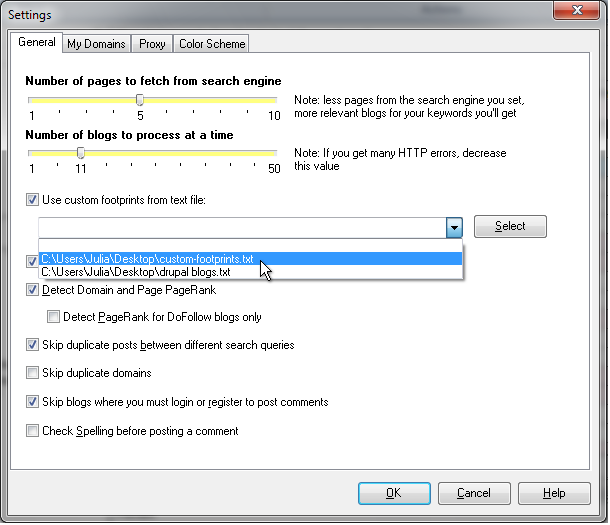
Click OK to save the Settings.
Type your keywords in the search field.
Click Start.
The program will search for blogs that have your keywords and your custom footprints.
When you use custom footprints, Fast Blog Finder does not determine the site type and PageRank automatically. All sites will have the Unknown type and PR 0. When the search is complete, determine the types and PR yourself by using the appropriate options on the program toolbar.
Using Single Custom Footprint
When you want to quickly find sites using one footprint only, it's not necessarily to save the footprint to a separate file. Just do this:
Check the "Use custom footprints from text file" option in Fast Blog Finder settings but DO NOT select any file.
Type your keywords + footprint in the search field and click 'Start'.
Examples:
site:.edu "powered by wordpress" – returns ALL .edu blogs powered by WordPress
allintitle:"keyword phrase" "powered by wordpress" – returns WordPress blogs with your keywords in the page title
allinurl:"keyword phrase" – returns ANY sites with your keywords in the URL
You can check the "Use custom footprints from text file" option in the program Settings but do not select any file with custom footprints and do not add any footprint to the search field. The program will return ANY pages with your keywords on them.
Searching for the Pages from One Domain Only
If you need to get the pages from one domain only, Fast Blog Finder makes it easily as never before. Just follow these simple steps:
Check the "Use custom footprints from text file" option in Fast Blog Finder settings and again DO NOT select any file.
Uncheck the "Skip duplicate domains" option.
Type site:domain in the search field, for example:
site:easy-ways-to-make-money-today.com
Hit 'Start'.
Or, type site:domain "keyword phrase" to get only the pages from a certain domain where your keywords are found:
site:easy-ways-to-make-money-today.com "email marketing"
To summarize, here are the steps to follow when you want to search sites using your custom footprints:
- Compile a file with custom footprints
- Select the file in Fast Blog Finder Settings
- Type your keywords and click 'Start' [use the Time Range menu to get the most recent pages]
- Detect the type of found sites
- Detect the PageRank of found sites
- Use found sites as you need
With these enhanced search capabilities Fast Blog Finder becomes as powerful as never before. You can find ANY sites from ANY platform for ANY keywords you may think of. But you don't have to take my word for it.