

Top 15 Questions about Fast Blog Finder
In this post we summarized the most frequently questions asked by Fast Blog Finder users and our answers to them. At the same time we give useful tips and recommendations on how to get the most out of the program.
1. Why are most of the blogs the program finds irrelevant to my search term?
Fast Blog Finder uses search engines (Google and Yahoo) to find blogs. Although you think that the posts are irrelevant, a search engine considered them as relevant to your search query. Your keywords can be not only in the article but in URLs on the page, or in the comments section.
To get more relevant results:
1. Go to Tools -> Settings and set 5 pages to fetch from search engine. Click OK.
2. Put your search phrase in quotes. And using this cheat sheet you can try different search queries in Fast Blog Finder to improve or refine your search results.
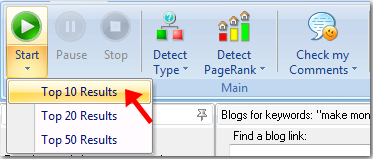
3. Select the Top 10 Results from the Start menu when you start the search. You will get less blogs in the result but those blogs will be the most relevant ones for your keywords.
Watch this video to learn how to get blogs which match your niche best. And remember that a link is a link. Even if you get a link from a blog that is not very relevant to your niche, it's better than not link at all.
2. Can Fast Blog Finder run a few searches at the same time?
No, it's not possible. Fast Blog Finder imitates a human search. It cannot search for more than one keyword phrase at the same time. Nor does it return hundreds of blogs within minutes. This is done to prevent the user's IP address from being blocked by search engines.
3. Is there a way to load my own blogs into Fast Blog Finder?
You can load your own blogs if you use Fast Blog Finder Gold edition. In the Free version this option is disabled. Watch this video to know how to load blogs into Fast Blog Finder.
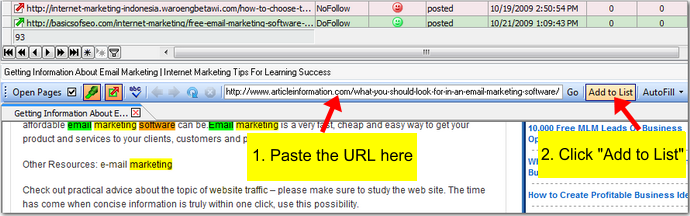
4. How to add a single URL to the list?
Copy the URL, paste it into the field above the preview screen and click on "Add Link".
5. How to delete a blog from the list?
Select the URL and press Del on the keyboard.
6. Is there a way of blocking some blogs from showing in the results again?
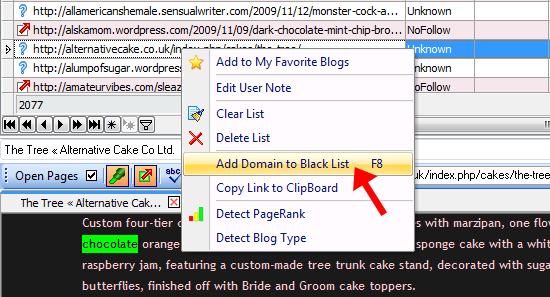
To prevent specific blogs from showing in the results again, you can add them to the blacklist (available in the Gold edition only). Just click the right mouse button on the link and select the "Add Domain to Blacklist" option. The program will add the domain to the blacklist, and the blogs from this domain won’t show in the results for future searches.
Or, you can click on the "View Blacklist" button on the toolbar and type the domains to the blacklist manually.
7. Is there a way to have unique results for each search? I don't need to see the same pages coming up every time I search similar keywords.
You can exclude duplicate posts between different searches. Go to Tools -> Settings and check the "Skip duplicate posts between different search queries" option (available in the Gold edition only). Click OK.
8. Is it possible to open multiple pages in different tabs simultaneously instead of waiting for each website to load?
Yes, it's possible. Just hold down CTRL on the keyboard and click the mouse on the links you want to open. Each page will open in a separate tab in the preview panel so when you finish posting the comment on the first blog, the next blogs are already loaded and waiting for you.
9. What do I type as "Name"? Do I need to enter my real name, or a nick, or my keywords? What is better?
Before posting a comment look at other people's comments and see what names they used. If others used only their nicknames without keywords, you will do the right thing to follow this rule. Probably the blog admin doesn't allow the use of keywords in the names for comments. Or, maybe you could enter your name as "John from mobile phones" or "John – mobile phones" or the like. Or, if someone used only the keywords and the comment was approved, you may think about doing the same.
10. Can Fast Blog Finder automatically fill in the comment form?
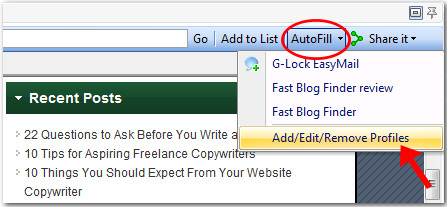
To pre-fill the comment form, you can use the AutoFill option in Fast Blog Finder. You can create different profiles for different niches and choose the desired profile from the AutoFill menu.
11. On some blogs I get a blank screen after submitting a comment. Was the comment sent to a moderator?
This is related to the blog theme where you submit a comment. If the theme is not properly configured, you may see a blank page after clicking the "Submit" button.
Fast Blog Finder uses the Internet Explorer engine to open the pages in the Preview pane. If the submission in Fast Blog Finder was unsuccessful and you got a blank screen, copy the post URL, open it in any other browser, for example, Mozilla Firefox, and try to submit a comment. If you still get nothing, so the blog theme is not correctly configured. Just skip this blog because you can do nothing about it.
12. While the program does find lots of blogs, most of them do not post my comment. Why?
It seems blog moderators consider your comments to be irrelevant to the post subject or think you submit a comment to get a link back only. You should look at other comments on the blog first to understand what kind of comments are approved. Pay attention to the names of other commentators. If you see they use names without keywords, do the same because the blog moderator may not allow comments with keywords in the name field. So, look at what others do and do the same. For more information read The Art of Blog Commenting
And the second reason why your comments are not approved may be that you submit comments to high PR blogs only. High PR blogs get a huge amount of spam so webmasters moderate comments like crazy on those blogs. Your comment must be really valuable and worth-while to be approved. So, don't limit yourself to high PR blogs only. Find relevant blogs with a lower PR and submit comments to them. There is a great chance your comment will be approved and you'll get a good back link.
13. Is there a way to tell the program to search for "DoFollow" blogs only?
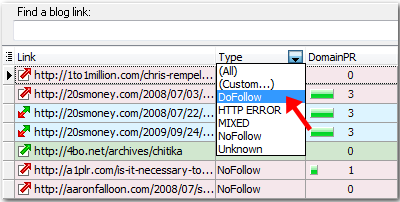
No, there is no way to tell the program to return only DoFollow blogs. You'll see the blogs of all types – DoFollow, NoFollow, MIXED, and Unknown – among the search results. After the search is complete, you can filter the blogs by type and separate only DoFollow blogs. To filter the blogs, click a down arrow in the Type field heading and select DoFollow.
14. Why are some blogs shown as "Unknown"?
If the blog remains as Unknown, it's impossible to determine its type because it has no comments or no links in comments. You will know if the blog is DoFollow or NoFollow only after at least one comment (maybe yours) is approved.
15. After checking for comments the program puts a red face for some posts, but my comment was there and approved. What happens?
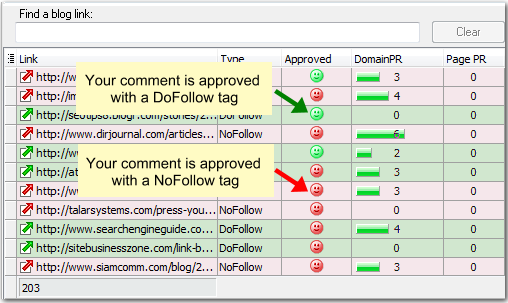
A red face in the Approved column means that the comment is approved and has a NoFollow tag. A green icon means the comment is approved and has a DoFollow tag. A yellow face in the status bar shows the total of approved comments within the current list.
If the comment is not yet approved, you will see no icon in the Approved column.
If you have any questions about Fast Blog Finder that are not answered here, ask them in comments below the post. I'd be glad to reply.