

Fast Blog Finder Gold Edition Beats Free Version
by a Whopping 500% Increase in Do-Follow Back-Links!
See the amazing results of our TEST below…
I sometimes hear people saying on the forums how easy it is to find DoFollow blogs manually by using Google blog search. But what they don’t know yet is how many hours, programs like Fast Blog Finder can save them, and more importantly – enable them to get direct traffic and do-follow back links to ANY site of your choice. How much time is one spending on average to find, let’s say, a hundred of DoFollow blogs?
Stop the guess work! I did a recent test to demonstrate how Fast Blog Finder can make your life easier, save you countless hours of time, effort and energy so you can decide for yourself if this is the right “weapon” in your marketing arsenal, or not.
The keyword phrase I used for my comparative test is “make money online”.
How many blogs does the Free version discover for you?
Although the Free version of Fast Blog Finder is very limited in features, it is worth giving a try; just experience its power before you decide for the GOLD version which unlocks the full benefits of blog commenting and back-link generation.
Because we want ONLY our best and most responsive clients use this tool we limited the Free version as following:
– Returns only 50 blogs for each search (mostly NoFollow);
– “Load Blog List” option disabled;
– Domain blacklist disabled;
– “Skip duplicate posts between different search queries” option disabled;
– “Skip duplicate domains” option disabled.
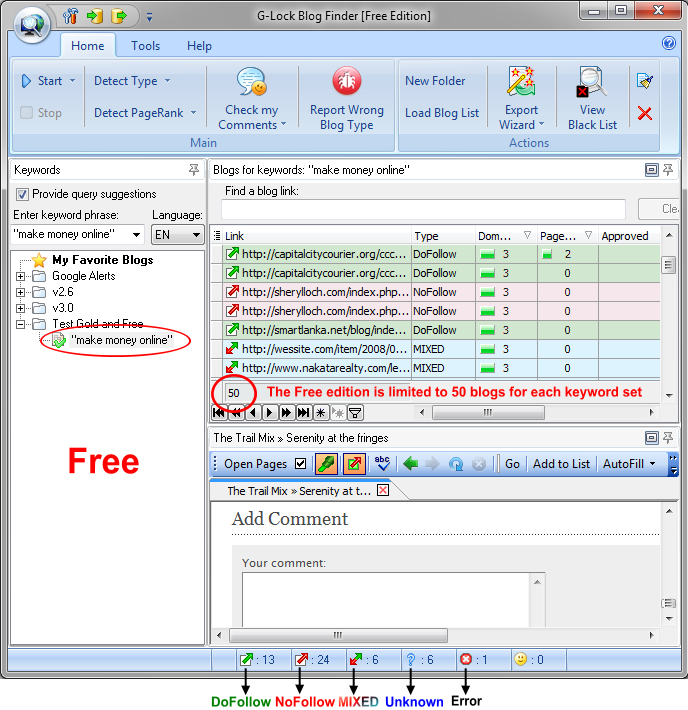
However, per our test, I got these results for the “make money online” key term:
DoFollow – 13
NoFollow – 24
MIXED – 6
Unknown – 6
HTTP error – 1
Click here to upgrade to the Gold edition now
So, in the Free version there are 13 DoFollow blogs to leave comments on in the first place. And I can sort 24 NoFollow blogs by the Domain PR and Page PR and comment on the blogs with higher domain and page PR hoping to get a little more human traffic to my website.
Hint: To sort the blogs by more than one column, hold down Shift on the keyboard and click on the column heading.
In addition, I have 6 blogs of the MIXED type. There is a mix of DoFollow and NoFollow links in comments on the blog. You can find the very best blogs for commenting among MIXED blogs. Some blogs of the MIXED type are set so that the commentator gets a DoFollow link after minimum 5 or 10 approved comments. So, only a few get the DoFollow link what makes those links extra valuable.
Hint: Did you notice the drop down menu in the Start button that allows you choose Top 10 Results, Top 20 Results or Top 50 Results? Using this menu you can limit the program to process only 10, 20 or 50 links from each search request in order to get the most relevant blogs for your keywords. Fast Blog Finder sends several requests to search engines for one keyword set and by default scans 100 links per page returned by the search engine. So, if you want to speed up the search process and get the most relevant results, choose Top 10, 20 or 50 results. For example, if you select Top 10 Results and run a search, you’ll get approximately 50-60 blogs for your keywords.
How many blogs does the Gold version retrieve for you?
Are you ready to see what the Gold edition can do for us? This version is guaranteed to save you countless hours of your time, effort and energy. Forget about manual blog research. Let our tool do its magic in the background while you work on your business, or spend time with your family.
It is like an instant jump in the pros league!
The Gold edition of Fast Blog Finder has no limitations on the quantity of blogs it returns. It will show you all the blogs that the search engine returns for your keywords.
Plus, you can indicate yourself the quantity of pages to fetch from the search engine. I used the default parameter – 3 pages.
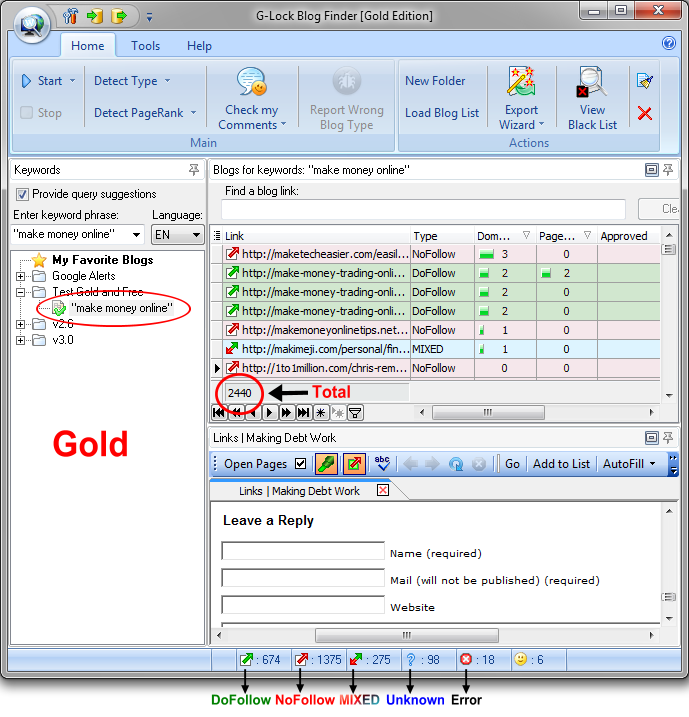
Well, for my test keywords “make money online” keyword test the Gold version returned 2440 blogs where:
DoFollow – 674
NoFollow – 1375
MIXED – 275
Unknown – 98
HTTP error – 18
Here is the visual proof.
Click here to upgrade to the Gold edition now
Can you see the difference now? I have 674 DoFollow blogs in the Gold edition against 13 DoFollow blogs in the Free version. It is like I’m getting 50x times more blogs, in an instant!
Plus, I have 1375 NoFollow blogs in the Gold edition. Those which have higher PR are worth to comment on too. Imagine the possibilities!
And 275 MIXED blogs in the Gold edition against 6 MIXED blogs returned by the Free edition is a marked difference.
As to Unknown blogs, if the blog doesn’t have any comments on the latest 10 posts, Fast Blog Finder classifies it as Unknown. In most cases these are abandoned, not supported anymore or simply crappy blogs. But sometimes you’ll get lucky and find a few gems among Unknown blogs. So, you’ll see whether the blog is DoFollow or NoFollow only after your comment is posted on the blog.
But that’s not all! Here comes the best part:
Fast Blog Finder Gold edition provides you with a couple of additional features that are disabled in the Free version…when you upgrade to GOLD you’ll be instantly able to…
- Exclude duplicate posts between different searches. If you run multiples searches for similar keywords and do not want the same posts to show in multiple lists, just go to the program settings and check the “Skip duplicate posts between different search queries” option. This way you’ll get unique results for each search query, without manual work!
- Add domains to the blacklist to exclude them from the search results. If you found any crappy blogs, you can add the domains to the blacklist and Fast Blog Finder will not show those blogs anymore. The domains are saved to a text file. You can open the text file (blacklist) and edit/delete the domains. It is a fun way to “manipulate” Google results!
- And what’s even more important is that you can import your own list of blogs using Fast Blog Finder Gold edition, determine the blog type and post comments on those blogs.
We found through extensive research and testing that none of our competitors offer the same highly sought-after benefits and features as Fast Blog Find GOLD version does!
Still not convinced? Read the users’ comments below the post. Or, jump in the pros league instantly:
Comments (70)
hi, thanks for the reply.
So i just put in the proxy ip in and port and tick the use http proxy server and thats all?
Do you know of a place where i can go to register for a http proxy server and get a username and password? I thought id ask you guys as you created this software lol and have added this part in the proxy field.
If i am wrong about how to use the proxy, please explain ok.
Thanks
Louis
I’ve been testing the free version for a while now and am finding it very useful, almost necessary. I just wanted to let you know that the software is great and will save me hours of time trying to find dofollow blogs manually. Thanks for a great product.
One question though, how does your software compare to other similar products, such as comment demon and the like? Thanks.
Steve
@Steve,
I found a review for Fast Blog Finder on the Internet. The author compares Fast Blog Finder to some other similar programs. You can read the review here: http://www.majikwidget.com/mw/blog/uncategorized/fast-blog-finder-review/
I have the Gold Edition and it’s brilliant!
Hi ComputerDoc,
>I’ve found that various dofollow finding tools often find off topic blogs and also find blogs that are seriously out of date. The off topic blogs might still offer an opportunity for generating some useful links.
Fast Blog Finder returns those blogs that Google sees to be relevant to your search keywords. You may think that some blogs are off-topic, but Google thinks that they are relevant to your keywords. You can enclose your search terms in quotes to get more accurate results. As to the blogs that are out of date, the search engine sees those pages as more trusted and returns on the top positions in the results. You can browse an old blog directly in the Blog Finder and if you find the most recent post on another page of the blog, you can write your comment and click Submit. After you submit the comment, the new recent page will be automatically added to the list of URLs in the Blog Finder.
>I think you should offer the option of returning only dofollow results. If you can tell it after the fact you should be able to query for it.
You can easily filter the blogs by the type and separate only DoFollow blogs after the search is complete. To do this, click a down arrow in the Type column and select “DoFollow”.
>Is this blog dofollow or nofollow?
Our blog is DoFollow. You can check it out yourself with the Blog Finder. Just add the URL https://www.fastblogfinder.com/fast-blog-finder/difference to the list of links and use the deep scan option. The type will be determined as DoFollow.
I have been using this FBF for a while know and it is a godsend for me. I have had always had tremendous resultswith blog commenting. This software just made it easier.
The SEO benefits you can get from commenting on blogs is well worth the cost of the paid version of the blog finder software. The free software version is good too but for a serious link-building campaign, especially for more than one website, I’d recommend buying the Gold version.
I set them manually
The deep scan take quite a long time to finish. I am thinking to upgrade to Gold, but wonder will the speed of scan increase in the gold version? Because the more blogs it returns, the more time it will take for deep scan :(, or is this simply because my internet connection?
The speed of the deep scan option is the same in the free and Gold versions of the Blog Finder. Of course, how fast this option is primarily depends on your Internet connection. And how much time the Blog Finder will spend to find the first post with the comments does matter too. If the program doesn’t find any post with comments among the latest 10 posts on the blog, the link type will remain Unknown.
This is way way better than Comment Kahuna. Comment Kahuna gives rampant websites like WordPress.com (which doesn’t make sense) when you don’t can’t even see a comment entry slot. I’ll definitely recommend this to my friends.
Thanks
Edmund
Hello,
Fast blog finder is a great tool! However, I am having trouble using the HTTP proxy server. I can not get FBF to work thru a secure proxy. Any suggestions?
Thanks
Hello,
If the URL gave the HTTP error, it means that either the page took too much time to load and the Blog Finder broke the connection to it by timeout, or the blog doesn’t exist anymore. You try to determine the type of such blogs later, maybe the next day. If they still give the HTTP error, most likely those sites are not live anymore.
I’ve found that various dofollow finding tools often find off topic blogs and also find blogs that are seriously out of date.
The off topic blogs might still offer an opportunity for generating some useful links.
I think you should offer the option of returning only dofollow results. If you can tell it after the fact you should be able to query for it.
Is this blog dofollow or nofollow?
Hi everybody, i just download “Fast Blog Finder FREE edition and use this software,
For newbie like me It’s very helpfull. I intend to get a gold version soon as we all know
the GOLD version is much much better
I have used the free version of your software and it appears ok.
I will go for the gold version in due course.
Thanks for a good software.
I started out with the free version, but quickly switched to the paid version as the added features are well worth the money. I’ve been able to locate a large number of blogs to comment on within a short period of time. If you happen to be on the fence with the gold version, don’t be. It’s worth the money. Note that I’m not an affiliate of this software, just a happy customer.
This is much better than Comment Kahuna or any other dofollow search engine out there. At least i will purchase and recommend to my peers.
I must say this page has convinced me of the value of the gold version. To be honest I had poor results from the free version (mainly because I see nofollow blogs as little value in a service industry). That said, I’m looking forward to unleashing this software. Thanks!
>JG As to the blogs that are out of date, the search engine sees those pages as more trusted and returns on the top positions in the results. You can browse an old blog directly in the Blog Finder and if you find the most recent post on another page of the blog, you can write your comment and click Submit. After you submit the comment, the new recent page will be automatically added to the list of URLs in the Blog Finder.
Some of these blogs most recent posts are over 2 years old. There should be a filter for removing blogs that haven’t had an entry since a selected date.
>I think you should offer the option of returning only dofollow results. If you can tell it after the fact you should be able to query for it.
>JG You can easily filter the blogs by the type and separate only DoFollow blogs after the search is complete. To do this, click a down arrow in the Type column and select “DoFollow”.
This method is much less effective because most of the sites returned are not dofollow.
>Is this blog dofollow or nofollow?
>JG Our blog is DoFollow. You can check it out yourself with the Blog Finder. Just add the URL https://www.fastblogfinder.com/fast-blog-finder/difference to the list of links and use the deep scan option. The type will be determined as DoFollow.
When I viewed the source of your blog, I saw rel = “nofollow” on some of the links. Why doesn’t this make it nofollow?
Is there a time limit to try to the free software after you download it? such as 30 days and then you have to upgrade for example? It looks very interesting and I wanted to have to time to check it out.
thanks
@Liam,
No, there is no time limit to try the free version of Fast Blog Finder. The free version will never expire so you can evaluate it as long as you want.
Julia,
I am testing the free version as I write this. It works great, but I did have two unexpected results, and was wondering if I needed to do something differently:
1) When I exported the data to both .htm and excel files, I expected to have live hyperlinks embedded in the files (which would make it convenient for clicking at a later time). But they all were non-hyperlinks.
2) When I exported the blog data, I lost the PR ranking order that I sorted before exporting the data (which is useful, but could be resorted in excel if needed).
Can these small items be handled in the product?
Thanks!
Hi Ron,
I forwarded your questions to our programmer and he improved Fast Blog Finder. Now after exporting the list to a .htm file, the links are presented as live hyperlinks. Unfortunately, this is not possible to the Excel file. Excel itself doesn’t allow this. Then, the list sorting is kept intact after the list is exported to file (this works if you export the lists one by one and not all the lists at a time).
We’ve just released an update – Fast Blog Finder v2.51. So, you can download and use this version.
Very impressive customer service and programming support. In fact, I don’t believe I have ever seen such rapid response and action to a question on a product – ever.
What are you trying to do, win us over with outright professionalism? I haven’t seen that marketing angle in a very long time. :))))
So far the free version for me has been useless. I’m very hesitant to buy the full version. I’ve gotten not even one do follow blog show up for several terms on the free version. 🙁 I see a lot of Unknowns but to go and comment on them and SEE if they will be dofollow defeats the purpose of using this kind of tool. I’m kind of bummed out. I wish I could see at least a few do follows so that I could be encouraged to buy.
Kate Dickmans last blog post.. Facebook’s Best Application Yet
@ Kate,
I entered one of your keywords “legal” into my Gold version of Fast Blog Finder and run a search. The program found 993 blogs, from which 48 are DoFollow.
Then I entered the “real estate” keyword phrase and searched for blogs. Now 756 blogs were found from which 75 were DoFollow.
Please, note that I did not use the “Detect Type” option to determine the type of Unknown blogs. After using this option, the quantity of DoFollow blogs may be higher.
I have been using gold edition since sept 2009 and I must say that it is a wonderful software that saves me lot of time searching “USEFUL LIST” of blogs. Helps to keep track of my activities so that I can avoid visiting same sites again and again until I need to do so. Really I can concentrate better just on commenting and get rid of all other painful tasks.
Hi,
First of all i have been using the gold edition from more or less the day it came out and it has been a god send to me and my partners.
The only problem i seem to have is with regard to proxies. On the proxy tab it says to enter the proxy and username and password, can you please tell me where i would go on the internet to get proxies with usernames and passwords?
i use proxy software called hidemyip and it works well for other software i use, but it seems to do nothing for this software. Hide my ip changes the ip in my internet explorer, what way does g-lock blog finder find blogs, i mean does it take any setting from explorer or has it an inbuilt browser for doing this?
Any help would be greatly appreciated as i have recommened this to many people who have gone on to purchase it
Thanks
Louis Neill
I just downloaded and tried out the free version, it found 50 sites for my main keyword – and out of those 50 only 3 PR0 came up green.
Is there anyway to find out how many the gold version would have given me? Maybe somebody can run the query for me and just let me know the amount of greens 🙂
Glenn
@Dumaguete Guy
Hello Glenn,
I did a test how the Gold version of Fast Blog Finder differs from the free version. Please, read my post here: https://www.fastblogfinder.com/fast-blog-finder/difference/
Hi Guys,
Has anyone found the new 3.0 version any good?
Thx
T
I think i will order the complete version.
I just tried out the free version and only got like 2 do follow results with pagerank 0….
Greetz
Nick
Forgot to also ask this.
How does the paid version compare to competition like CommentKahuna. CommentKahuna find Do Follow and also CommentLuv blogs, is that good , bad.
I don’t use any at the moment but would like someones opinion please
Pauls last blog post.. Pino Japanese Bite Sized Ice Cream
Hi everybody, i just download “Fast Blog Finder FREE edition and use this software,
For newbie like me It’s very helpfull. I intend to get a gold version soon as we all know
the GOLD version is much much better
Hi,
I am very much impressed with the quality of free version. I am sure to buy the Gold edition pretty soon. Thanks for the cool and short pdf on GoogleRankGlitches.
Great software analysis. Its only helpful to place links on do follow sites as google only gives credit for them. although placing them on the no follow sites will not harm you in any way either.
We’ll test out the software as we just got the gold edition and post our review here soon
I am wondering if anyone knows how to turn off No Follow on a WordPress blog (the kind that you install on your own domain). I have searched through the various WP instructions and cannot find anything about it. I would like to make my blogs Do Follow. Since there are good spam filters, I am not sure why we need to be No Follow any more.
Is it necessary to use a proxy server? What risks are posed by not using a proxy server?
Thanks
@ Kate
I would not agree with you in principal since I’ve been using it for just about a month now and it does give results for dofollow blogs even though I’ve never gotten beyond the 6 or 7 mark. That being said I’ve been trying to find blogs for something else now and it hasn’t been all that helpful, read 0 dofollow blogs.
@ Julia
Just wanted to ask if the “Detect Type” option is available in the free edition too, and if it is how to activate it.
@Allen,
>Just wanted to ask if the “Detect Type” option is available in the free edition too, and if it is how to activate it.
Yes, the “Detect Blog Type” option is available in the free version of Fast Blog Finder. To detect a type of an Unknown blog, click the right mouse button on the URL and select the “Detect Blog Type” option from the menu. Or, you can click on the Detect Type icon on the toolbar and select to detect the type of either all unknown blogs on the list, or of selected blogs only.
There are several free plugins available that automatically remove the nofollow attribute value.
Comprehensive Reference for WordPress NoNofollow/Dofollow Plugins
I m interested in triying this software. Can anyone tell me how can i get the Blog Finder Gold Edition?It seems to be better than the Free Edition…
Thanks in advance.
Regards
Hello Galatea,
The Fast Blog Finder Gold edition costs $99. You can order it on this page https://www.fastblogfinder.com/order/
Since the day before yesterday i was trying the free version. It is a very goog program and the same day I downloaded, I started already to comment.
Googling about the “unknown” posts I found your blog, read the text and decided to buy the gold version. To my keywords, in english, I found 4 dofollow, but with the gold version, I hit 49 green posts. Its amazing!!
Thank you very much!
I have been looking for a tool like this for a while now. The last product I tried was Real Link Finder was very impressed, certainly not enough to upgrade, will check out your product.
Thanks
Hello Marc,
>Is it necessary to use a proxy server? What risks are posed by not using a proxy server?
No, using a proxy server is not necessary. There are no risks if you do not use a proxy server. Just, please, keep in mind that if the quantity of requests for Page and Domain PR from one IP address surpasses ~2000, Google stops returning the PR. The indicator at the right bottom corner in the Blog Finder becomes red in this case. So, if it happens you can change the program settings and use a proxy server to find blogs and determine their PR.
I’m currently using the free version. I have not found another tool that is this helpful in terms of finding dofollow blog sites. The program is user friendly and its great how you can sort the results by Home Page PR as well as Page PR and number of outbound links. Simply Wonderful! I will be upgrading soon to the paid version.
I started out with the free version, but quickly switched to the paid version as the added features are well worth the money. I’ve been able to locate a large number of blogs to comment on within a short period of time. If you happen to be on the fence with the gold version, don’t be. It’s worth the money. Note that I’m not an affiliate of this software, just a happy customer.
I am looking for some blogs which subject like SEO, link buildings, Forums and so on. But using software comments kahuna, Fast Blog Finder, IBP etc found a little some amount of blogs that usually ranked hiher than 3 and open for comments. Any body give me some suggession that how can I found a great list? my mail nasirhuq@gmail.com
Thanks
Joomla Software
http://Nirvana-bd.com
Hi guys, have you actually seen any results from dofollow blog commenting? I’ve personally done this in the past and saw no change in ranking for quite some time. Otherwise if the blog commenting is working I see that software is the perfect solution that can save time.
Wow…i’m sold….been using the free edition and i’m lacking all this stuff. is ther way within the program to not open the pages itself but to JUST open Firefox (or whatever browser the user has)?
The free version is excellent – the only problem is the limited number of returned blogs. The Gold Fast Blog Finder is now top of my list to purchase. Great work!
Oh Great Posts! i am actually using this and this is nice but I need original edition rather than free one. This software is nice for find new blogs and it has many options and you can also keep information for previous keyword search…so I think that has something new for its special feature and usefulness
Suggestion: In the free version, also provide the number of sites that the GOLD version would have provided as a teaser.
Also, I’m wondering about the benefit, or lack thereof, of posting a “keyword tagged” blog comment on a totally unrelated blog. For instance, if I put up a health keyword name on this blog post … would that help me, hurt me, or have no effect?
For most free proxies you don’t need the username and password. Simple leave these fields empty
Wow,
I have just discovered and installed this software. It is SUPERB!. These days is really daunting task making a solid back link structure. My tactics so far was usually related to Forums search for referring keyword as there is still a lot of forums out there set to do-follow. But this software is another try for blogs 🙂
At the moment I am still using a free version, but I am already quite sure that after a few days playing with it, I will go for Gold one:)
Hi Louis Neill,
>i use proxy software called hidemyip and it works well for other software i use, but it seems to do nothing for this software. Hide my ip changes the ip in my internet explorer, what way does g-lock blog finder find blogs, i mean does it take any setting from explorer or has it an inbuilt browser for doing this?
Please, try to do this:
1. Go to the Advanced Settings in Hide My IP
2. Check the “Use Proxy Field Method for Internet Explorer” option
3. Click Apply, then OK
4. Go to the Internet Explorer
5. Click Tools -> Internet Options -> LAN Settings
6. Copy the proxy server address and the port
7. Paste the proxy server address and the port into the Settings in Fast Blog Finder.
If you are looking for proxy servers, you can go to this site http://www.proxyblind.org/ and register on their forum. People share the proxy lists there. To verify the proxy servers for validity, you can use the Advanced Administrative Tools software, in particular the Proxy Analyzer module from this tool. You read more about the AATools here http://www.glocksoft.com/aatools.htm
I love the idea of this program and have used the free edition a few times. I was really looking forward to purchasing but couldn’t believe that the term “bed linen” returned one blog. One. How can this be…? Must have done something terribly wrong I guess. =)
@ Pat
I entered your keyword phrase “bed linen” into the Gold edition of Fast Blog Finder and it found 276 blogs.
A great feature (or new software) I would love to see is the ability to import a list of blogs and have the program tell me if they use dofollow or nofollows. Any chance we could see this sometime in the future?
Hello Colin,
Thank you for the suggestion. It would be a nice feature. However, to calculate how many blogs the Gold version would have returned, the program would have to conduct a search for all the blogs. This would take much Internet traffic. I don’t think the user would be happy with this because he won’t see the blog URLs and consequently won’t be able to submit comments on those blogs.
If you post a comment with your keyword on an unrelated blog, this doesn’t matter for search engines. It won’t hurt you. But it may matter for the blog owner. Will he/she want to approve your comment if your anchor text is not related to the blog subject? It depends on the blogger only. You should see how other commenters did. If hey used their names or nicknames, you should better do the same thing. If you notice that somebody used the keywords as the anchor text and the comment was approved, you can try to do so too.
I would recommend that you read my recent post where I tell about the use of names and keywords in the anchor text when submitting the comments. You can read the post here: https://www.fastblogfinder.com/can-nofollow-links-hurt-you/
I think that every backlink that is coming in your site is good. Remember also that it is bad think that
anghor text is always same keyword. I think you must do variations with your keyword anghor text.
Sometimes main keyword, then variations. What you think ?
Gold edition is best.
Hi admin,
can you explain what is HTTP error?
By the way, the progress and update on this tool is truly amazing!
Here is what i really want to know..i’ve got the free edition…got some good pr7 blogs as well. but i never got 5 blogs for about 30 search keywords…never mind that…the question is..will i get the same results on the gold edition every time i search for the same keyword? i mean EXACTLY the same results? i also got some bad results like searching for web design found me a blog about medicine…pretty strange right?thanks
Sorry…I am not sure if my post went thru so I am posting again. Please see below:
Hey guys I just downloaded the free version…but at this time I do have a few questions:
1. Is it required to use some type of IP cloaking/masking? After all, if the software stops working with Google because of too many searches (2000 or more) does this apply if you are on a shared IP address such as COX high Speed Interenet?
2. Is there a feature that will allow the free version to autopost to blogs? If not, does the paid version have that capability?
3. How deep does the search go into Google? And can I set it so it searches Yahoo or MSN as well?
Please lete me know.
THX
@Darrell,
>1. Is it required to use some type of IP cloaking/masking? After all, if the software stops working with Google because of too many searches (2000 or more) does this apply if you are on a shared IP address such as COX high Speed Internet?
It doesn’t matter what IP address you use. Google will block that IP for several hours after 2000 requests for PR. You don’t need to use any IP cloaking. You can use a proxy server while your IP address is blocked by Google.
>2. Is there a feature that will allow the free version to autopost to blogs? If not, does the paid version have that capability?
No, there is no feature to autopost on the blogs neither in the free or Gold edition of Fast Blog Finder. It is supposed that you should read or at least look though the post before posting a comment. A meaningful and valuable comment that adds to the conversation is likely to be approved by the blog moderator while an automated comment is likely to be flagged as spam and deleted.
>3. How deep does the search go into Google? And can I set it so it searches Yahoo or MSN as well?
You can go to the Settings -> Advanced and set the number of pages (100 links per page) to fetch from the search engine. By default Fast Blog Finder is set to fetch 3 pages from Google. I.e. it will search the blogs on first 3 pages in Google results. You can set more pages to fetch. Fast Blog Finder doesn’t search in MSN. But it searches in Yahoo if it finds no blogs for your keywords in Google.
A great feature (or new software) I would love to see is the ability to import a list of blogs and have the program tell me if they use dofollow or nofollows. Any chance we could see this sometime in the future?
I have just installed the free version and it has asked to register etc. once I have done that and later I want to go for the paid version what happens? Do I have to uninstall and install a different version? Do I just put in a new serial number? What exactly happens when upgrading please?
i have gold edition about the software. i need also Turkish Language for blogs.