

The version 3 of Fast Blog Finder has a couple of new options and features that can definitely help you improve the search results and make your use of the program more effective. In this post I'll examine each new feature more closely.
Finds More Blogs and Determines Blog Type More Accurately
Fast Blog Finder v3 has a new engine which recognizes new blog platforms and finds much more blogs than the previous version. See Fast Blog Finder v2.6 vs. v3.0: Live Test. When developing the v3.0 we spent many hours for manually verifying hundreds of blogs to ensure that the program determined the blog type correctly. And it's fair to say that Fast Blog Finder v3 is 99% accurate in determining the blog type.
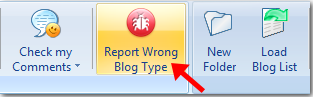
To find that 1% of incorrectly determined blogs, we added the "Report Wrong Blog Type" option to the program. Using this option you can send us the URL of the blog that was determined incorrectly by Fast Blog Finder. We'll check it out and make improvements in the program engine. When a new version of the checking engine is available, Fast Blog Finder will download it automatically when you open the program. You won't need to re-download and re-install the entire program. Fast Blog Finder will update the checking engine automatically every time a new version of it is available.
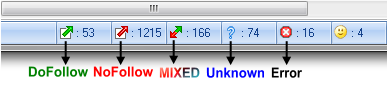
In addition, Fast Blog Finder v3 recognizes the new blog type – MIXED. These are blogs that have both DoFollow and NoFollow links in comments. Some blogs are set so that the commentator gets a DoFollow link after minimum 5 or 10 approved comments. So, there is a mix of DoFollow and NoFollow links in comments on the blog. The earlier versions of Fast Blog Finder classified blogs with DoFollow and NoFollow links in comments as NoFollow.
Returns Most Relevant Blogs for Your Keywords
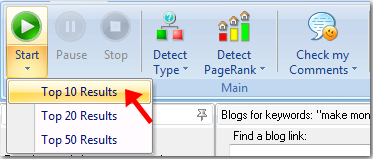
By default Fast Blog Finder takes 3 pages with 100 links per page from the search engine and scans them for blogs. In the v3 you can limit the program to the top 10, 20 or 50 results from the search engine.
For example, if you select Top 10 Results from the Start menu, the program will scan the top 10 links returned by the search engine for your keywords. Since Fast Blog Finder v3 sends several requests with different footprints for your keywords, you will get approximately 50-60 blogs in the result. Using this option you can save your time for the search process and get the most relevant blogs for your keywords.
Automatically Fills in the Comment Form
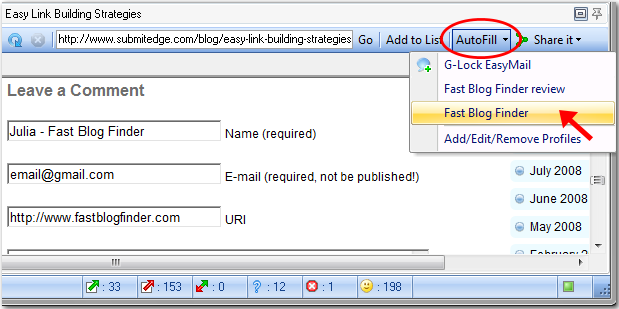
With the new AutoFill option in the v3 you can fill in the comment form on the blog with two mouse clicks. Just create a profile with your name, email, URL and signature and click AutoFill when you want to submit a comment.
And what is nice is that you can create multiple profiles with different names, email addresses, links and signatures for different niches and choose the desired profile from the AutoFill menu when you want to post a comment. If you check the "Set as Default" option for the profile, the default profile is loaded automatically when you click on AutoFill button. If you want to choose any other profile, click a down arrow in the AutoFill button and choose the desired profile from the menu.
Checks Blogs for Approved Comments
A cool feature that saves your time greatly as you don't need to open each page and check if your comment is posted or not. Fast Blog Finder v3 will check it for you. All you need to do is:
1. Go to the program settings, click on My Domains tab and type the domains you used to post comments, for example:
domain1.com
domain2.com
domain3.com
2. Select the list where you want to check the blogs for your comments
3. Click on "Check my Comments" option on the toolbar and select the blogs (all or selected).
If your comment is approved and posted, you'll see either a green or red icon in the Approved field for the blog.
A green icon means that your comment is approved and has a DoFollow link inside. A red icon means the comment is posted with a NoFollow link inside.
And the Status bar will show you the total of approved comments.
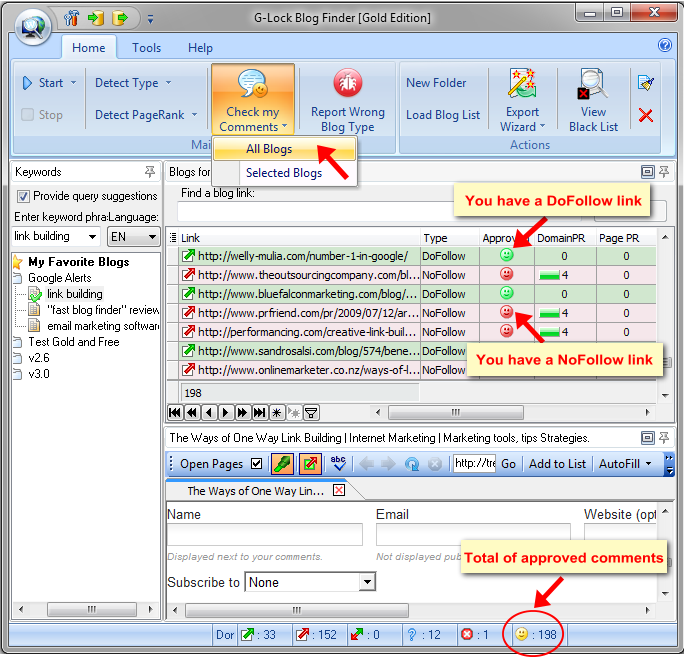
Note: if you have more than one comment on the page and the links in the comments differ by type, the program will take the first link it finds and put the respective icon in the Approved column based on the first link type. For example, if the first link the program finds is DoFollow, you'll see a green icon in the Approved column.
Detects Domain PageRank and Page PageRank on Your Choice
The earlier versions of Fast Blog Finder detected PageRank automatically during the search process. Or, you could set the program to detect PageRank for DoFollow blogs only.
Fast Blog Finder v3 has the enhanced "Detect PageRank" option.
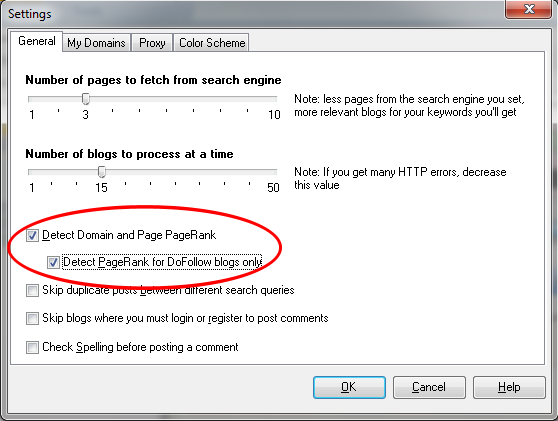
If you want to speed up the search process and avoid being blocked by Google, you can disable PageRank detection during the search. Or, you can enable the PageRank detection for DoFollow blogs only as before.
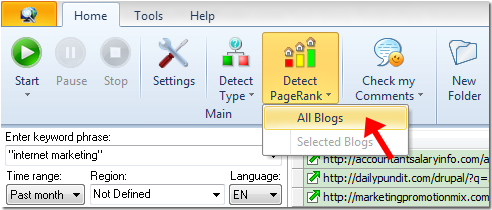
If you did not request PageRank during the search, you can do it after the search process is complete. You can select the blogs you like more and detect PageRank for selected blogs only. Or, you can run Fast Blog Finder to detect PageRank for all blogs.
Quickly Finds a Link Within the List
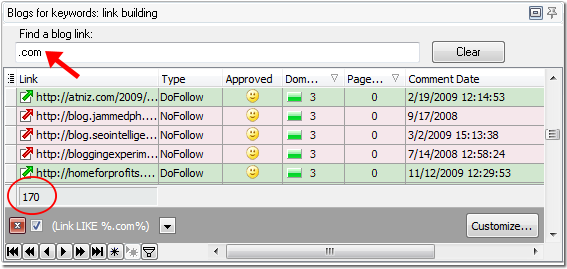
In the new 3 version of Fast Blog Finder we added a quick search option. If you need to find a link within the list, start typing the URL in the search field. The program will display the links that satisfy the search criteria.
This is also a quick way to filter the blogs and search for top level domain names (.gov, .edu, .net, .com, .org, etc.). Below the grid you will see how many blogs were found by your search criteria. To cancel the filter, click Clear.
Processes Multiple Blogs At a Time
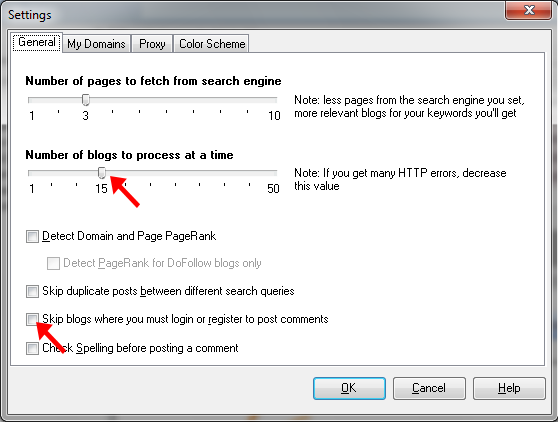
Now you can define yourself how many blogs Fast Blog Finder will scan at a time to determine the blog type and PageRank. By default the program is set to process 15 blogs at a time. You can decrease or increase this value in the settings. Note that if you set more than 15 blogs, the program will work faster but you may get more HTTP errors. 15 blogs at a time is the optimal value.
Skips Blogs Where You Must Login or Register
There are some blogs where you must login or register before you can submit a comment. With Fast Blog Finder v3 you can exclude such blogs from the search results if you don't want to spend time for filling in the login/register form on the blog. Just go to the program settings and check the "Skip blogs where you must login or register to post comments" option.
Uses HTTP Proxy Server
Fast Blog Finder v3 can find a few times more blogs than the previous versions. Because of the increased quantity of blogs the version 3 operates with, the quantity of requests for PageRank grows too. Our test shows that Google allows about 2000 requests for PageRank from one IP address. After ~2000 requests Google blocks the IP address for a few hours and doesn't return the PageRank. The program continues searching for blogs but PageRank is not determined.
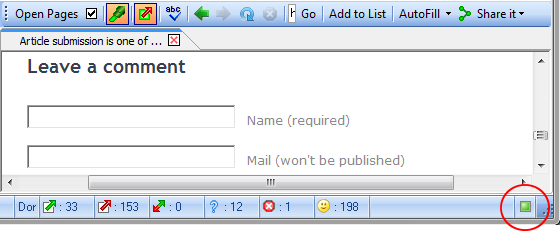
You can look at the indicator at the right bottom corner of Fast Blog Finder window. When it is green, Fast Blog Finder searches for blogs and determines PageRank. When the indicator becomes red, it tells you that the program stopped sending the requests for PageRank in order not to flood Google with useless requests.
As a workaround, you can do the following:
1. Use a proxy server in Fast Blog Finder
Go to the Tools menu and click Settings.
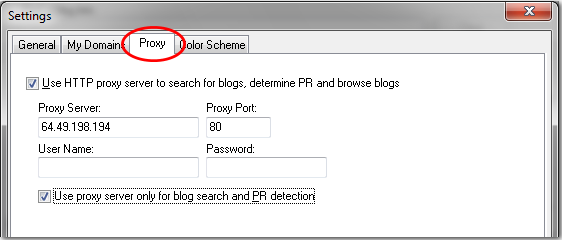
Click on the Proxy tab in the Settings.
Here are the options you have:
Use HTTP Proxy Server to search for blogs, determine PR and browse blogs
If you check this option, you can use a HTTP proxy server to search for blogs, determine Domain PR, Page PR, and browse found blogs. Be sure to enter the proxy server, port, your user name and password for the proxy server (if required).
Use proxy server only for blog search and PR detection
If you check this option, the HTTP proxy server will be used to search for blogs and determine PR only. When you browse found blogs, the proxy server will not be used.
2. Disable PageRank detection during the search
Go to the Settings (General tab) and uncheck the "Detect Domain and Page RageRank" option. After the search is complete, you can select the blogs you like more and detect PageRank for selected blogs only using the Detect PageRank menu.
3. Set the program to determine PageRank for "DoFollow" blogs only
Go to the Settings (General tab), check the "Detect Domain and Page RageRank" option and then check the "Detect Domain and Page PR for DoFollow blogs only" option.
Note: if you need the PR for the blogs of all types, consider using a proxy server and change the proxy server when the indicator becomes red.
Comments (21)
The previous version already serve my purpose really well. And this one is even better. Good job guys. Keep up the good work.
Out of the different types of software I have used to find “dofollow” blogs, this software is the best version by far. Finding blogs related to your content is not easy, but this tool makes the process mindless. Guys, nofollow links are also good, if you want to get your pages indexed. Don’t avoid them just because they are nofollow. I find that even submitting xml sitemaps do not always solve the problems of getting deep links indexed. If you want that special product page indexed and Google just isn’t finding it, a nofollow backlink will work wonders, even if it doesn’t pass any juice.
Just a little tip 😉
Does the software look through a variety of different blogging platforms, or just Word Press?
@Micro Niche Finder
Fast Blog Finder searches for blogs on WordPress and Drupal only. There are DoFollow and NoFollow blogs on these platforms. Blogs on all other platforms are all NoFollow.
Since relevance is king, it would be helpful if I could filter or search for my keywords in the domain / URLs found by FBF3. If someone happens to mention my key phrase “dog training ” while posting on golfing-blog.com – that’s a false positive in my head. But http://www.fluffy-dog.com/training, now that’s relevant!
What can I do to search on domain names instead of contents?
Thanks
WOW Great Software. Thanks for sharing this software with us. I have to spend hours and hours to find dofollow blogs but i think this will solve our problem. let me try free version and then i will buy it fully. I am using Comment Kahuna software to find dofollow blogs but it is not very helpful.
Great software! Here is a tip for everyone out there. Don’t necessarily ignore pages with nofollow tags. The page has a high PR post anyway.
Why?
Yahoo and MSN still respect the link PLUS if you check your external links section in Google Webmaster Tools it will still show the link. So while it may not pass any link juice Google still tracks the links. Hmmmm…
I’ve only just come across this program, but it’s very impressive. I’m just trying the free version, but am very tempted to get the full thing.
Thanks
Juliette
Just bought version 2.x and i’m very happy with results. More than 1500 search results for searched key phrase.
My compliments for great software!
I’ve bought the gold version few months ago and I must say I’m satisfied with this software. Just a question though, sometime I see that there is a number(1 or 2 or 3, beside the green indicator) when searching the blogs, what does it means actually? Red indicator means it won’t return PR, how about green indicator with number beside???
Thanks
@Kenneth,
The numbers near the green indicator show that the Blog Finder calculates the blogs for which the PR wasn’t determined to make sure Google doesn’t return PR anymore. It means that the indicator will become red soon.
Wow, am impressed with the new v2 features. The best blog finder just got even better! Blows the competition away. Can’t wait to try this time saving, link building s/w.
This is a great software, excellent growth potential for websites, may I suggest you add a syntax section, this would help to focus in on specifc phrases.
Excellent additions to an already great program. One note on the proxy server; maybe it is better to allow a list of proxies to be entered, and the program to randomly use them to determine PR, and the program to ignore the bad ones. Overall, this is an INCREDIBLE improvement, and SHOWS your COMMITMENT to grow this product.
~steve
I really like the option to only check PR for the DoFollow blogs. I’ve tried proxy servers in the past and found them to be slow and sometimes google doesn’t seem to allow them (the expected results are not returned). Since the percentage of DoFollow results is relatively small only checking the dofollow blogs for PR should eliminate the need for a proxy server. Great feature!
I love the feature about mixed links. I just learned about the plugin that creates those mixed link blogs. Good for the blog owner bad for the commentor. I’m debating whether or not I want such a feature on my site. A single respectable comment deserves link love right from the jump.
I’ve been testing the free version for a while and am very impressed with this software. At the sametime, i am also trying out others similar blog finding softwares. My findings are that blog finder shows very accurate dofollow blogs on a page level as compared to few others that i’ve tested. I give this piece of tool a thumbs up!
Great work!
I would also definitely say to people not to ignore NoFollow sites when using this software. From personal experience, I have seen my rank improve on a blog that I wasn’t updating for a somewhat competitive term significantly and I am 100% the only new links being created were NoFollow blog comments. I have also seen NoFollow links appear in google webmaster tool, so even if there really is no PR passed on, they are still beneficial
Great to see these new features, and can’t wait to try them out. Thanks for this fantastic product, it’s such an invaluable tool 🙂
Fantastic, I’ve been looking for something a little more comprehensive as what I’m currently using doesn’t seem to be doing the trick. It still needs a lot of manual work to go through each link and make sure it’s valid. With this, I suspect the validity of the URL’s will be a lot better than the current software. Thanks for the free version too – going to get it and check this out and see if there is any considerable improvement over my current software.
about the check approved comments, does this also work if we don’t comment from the program itself?
I guess we’ll have to insert the details of course, but we work as a team, 1 person using blog finder to find the blogs, another person doing the comments from a firefox browser …